
Internal developer portals / internal developer platforms (IDPs) have become standard infrastructure for the most innovative software orgs. Gartner's 2025 Market Guide for Internal Developer Portals projects that 85% of software engineering organizations will adopt an IDP by 2028, up from less than 25% in 2023. As adoption accelerates, the choice of platform matters more than the decision to adopt one: the wrong IDP adds configuration overhead instead of removing it.
If you're evaluating Port, here's a breakdown of its features, use cases, and trade-offs. We'll also evaluate how it compares it to Cortex, Backstage, and OpsLevel so you can make the right call for your organization.
What is Port?
Port (getport.io) is an internal developer portal designed primarily for platform engineering teams, DevOps engineers, and SREs who want to streamline service management and automate infrastructure provisioning. The platform emphasizes flexibility and customization, allowing teams to define their own data models and build custom workflows for their specific needs.
Founded in Tel Aviv, Port has raised funding to build what it describes as a highly customizable internal developer portal. The company's core philosophy centers on giving platform teams complete control over how they structure their portal, what data they track, and how workflows are automated.
Port's customer base includes platform engineering teams at growing tech companies and organizations with strong DevOps practices. The platform appeals particularly to teams that have the resources to invest in customization and want to build workflows tailored to their specific infrastructure and processes.
However, the platform's architecture requires significant upfront configuration. Unlike some alternatives that provide out-of-the-box data models and integrations, Port operates on the principle that teams should define everything from scratch. This approach offers flexibility but comes with trade-offs in time-to-value and ongoing maintenance requirements.
Key use cases for Port
Port positions itself around several core platform engineering use cases. Understanding these use cases and their limitations helps clarify where Port excels and where teams might need to supplement with other tools.
Service ownership and cataloging
Port provides a service catalog that teams can customize to track services, dependencies, and ownership information. The platform allows you to define custom data models, so you can structure your catalog around your specific architecture and organizational needs.
Flexibility for non-standard architectures. You can define custom entities beyond just services—teams, environments, cloud resources—and create relationships between them. For organizations with ecosystems that don't fit typical service catalog patterns, this extensibility is helpful.
High maintenance cost. Building and maintaining a comprehensive catalog in Port requires significant ongoing effort. Data structures must be defined by hand, and keeping them current demands continuous configuration. On ownership specifically, Port's SCIM support covers user lifecycle (provisioning and deprovisioning from your IdP), but group provisioning isn't supported and team membership refreshes on login rather than syncing continuously, so team-level ownership mapping needs manual upkeep. This burden grows as development teams change and services evolve.
Workflow automation and AI agents
Port lets teams build self-service workflow orchestrations that automate platform engineering tasks like delegating tickets or routing routine operations. With Workflows, Port acts as an orchestration layer above your existing tools: a workflow runs the business process as native steps (context, branching, approvals, AI nodes, notifications, catalog updates) and hands each heavy technical step (build, deploy, provision, run the job) to the system that already does it, from GitHub Actions and GitLab to Jenkins, Azure DevOps, or a webhook. Port AI is an agentic layer over the catalog. It runs in Ask, Plan, and Build modes: Plan proposes a step-by-step change, Build executes it with per-tool approvals, and together they can create blueprints, upsert entities, trigger workflows, and build dashboards.
That has practical consequences for teams. Port's classic Actions, which Port now labels a legacy execution system, are single-step; the multi-step logic, branching, and human-in-the-loop approvals live in Workflows, which track each run step by step inside Port. Service scaffolding is orchestrated through a workflow, but the templating and code generation (for example, Cookiecutter opening a GitOps pull request) still run in your CI. The workflows, nodes, permissions, and custom agents themselves are yours to design, govern, and maintain, which is significant platform work even with an AI builder to help: someone owns the prompts, the model behavior, and the judgment about when an AI step adds value versus introduces unpredictability.
Self-service infrastructure provisioning
Port enables self-service infrastructure provisioning through its action framework. Developers can request resources like databases, queues, or cloud services through Port's interface, with approval workflows and automated provisioning orchestration handled behind the scenes.
This use case works for organizations with standardized infrastructure patterns and clear governance requirements. Platform teams can encode their standards into the provisioning workflows, ensuring that all resources meet organizational requirements for security, tagging, and lifecycle configuration.
On the other hand, portability and standardization are major limitations of the platform. Because workflows and data models are custom-built for Port's specific architecture, migrating to other platforms or integrating with different tooling can require substantial rework. Organizations need to weigh the value of customization against the risk of vendor lock-in and ongoing maintenance burden.
Port's key features
Understanding these capabilities, and how they compare to alternatives, helps clarify Port's positioning in the IDP landscape.
Service catalog
Port's service catalog is built on a flexible data model that teams define themselves. Rather than providing a predefined structure for services, dependencies, and teams, Port gives you a blank canvas to create custom entities and relationships.
This approach offers maximum flexibility. If your organization has unique requirements, Port's extensible catalog can accommodate them. You define the properties, relationships, and metadata that matter to your organization.
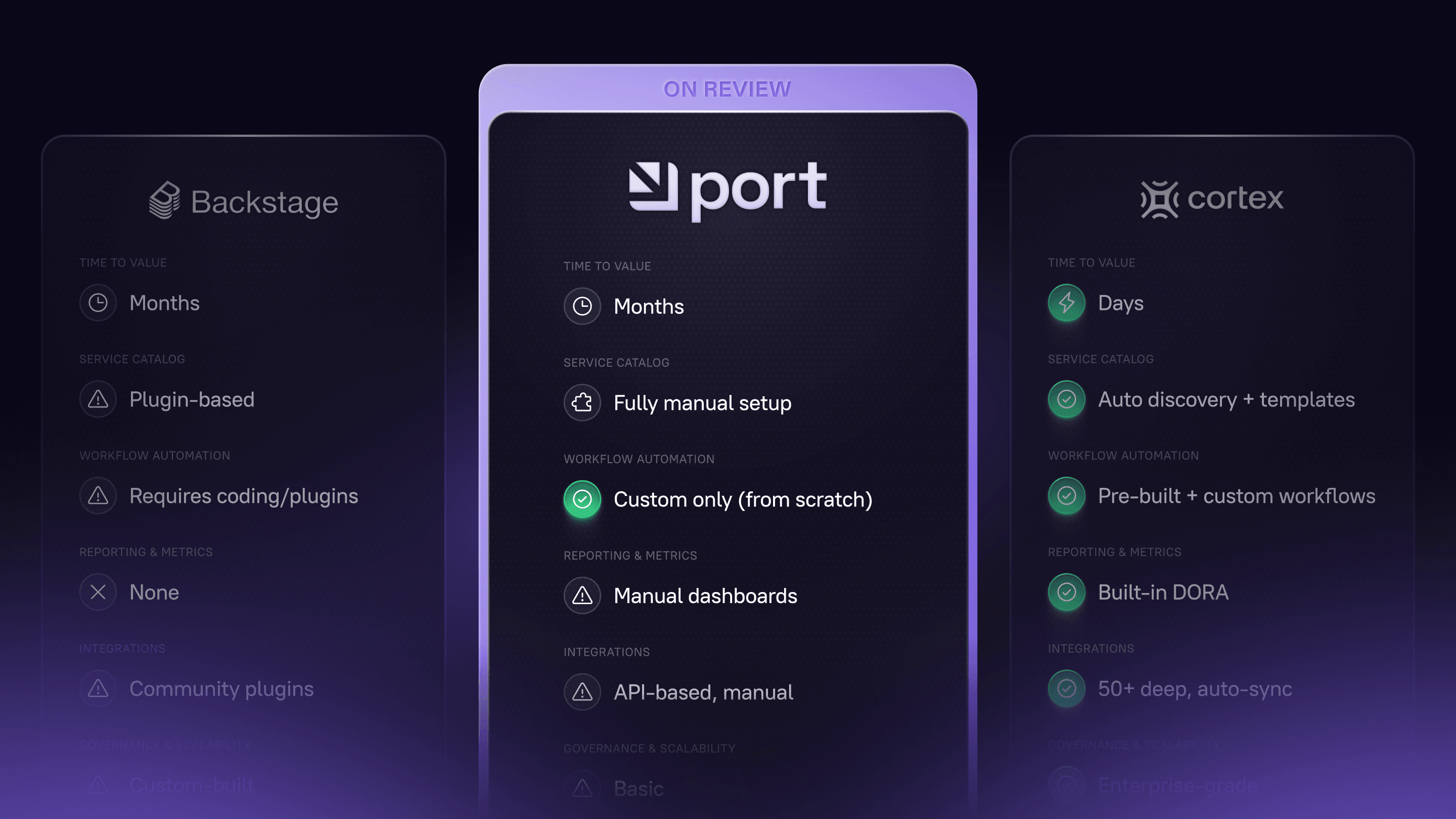
However, getting a Port catalog up and running requires significant configuration work. You need to define your data model, set up integrations to populate data, and create the views and dashboards that make the catalog useful. For teams that want a catalog running quickly with minimal configuration, alternatives like Cortex provide pre-built data models and automatic discovery that deliver value in days rather than months.
AI-powered workflows and self-service actions
Port's workflow engine includes AI capabilities, allowing teams to create self-service actions with AI steps. Teams build orchestration for spinning up new services, provisioning infrastructure, updating configurations, or executing operational runbooks, all with the option to incorporate AI assistance at various stages.
This capability is build-it-yourself. Workflows track runs step by step inside Port, but a team still designs the graphs, branching, approvals, and permissions, and wires in the systems that do the technical work. Port ships native workflow nodes for common tools like GitHub, GitLab, Azure DevOps, and Jira, with webhooks, Kafka, and the Port execution agent for everything else, so custom tools and bespoke steps still need to be wired up. The custom AI agents a team builds on top carry their own prompt and reliability upkeep as models and infrastructure change.
Sustaining custom AI-powered workflows at scale still calls for platform engineering capacity.
Integrations with DevOps and cloud tools
Port offers integrations with common DevOps, observability, and cloud platforms, including GitHub, GitLab, Kubernetes, AWS, and others. These integrations allow Port to pull data into your catalog and trigger external actions through workflows.
Port combines pre-built native integrations with webhook and API-based ingestion. Many common sources auto-discover and sync out of the box. Custom and non-standard sources still require you to define what data to pull and how to map it, and Port's mappings stay customizable through YAML and JQ, so some configuration is expected for anything off the beaten path.
Automation
Port's automation capabilities extend beyond workflows to include scheduled jobs, event-driven actions, and automated updates to catalog entities. Teams can create automation that responds to events in their infrastructure and update relevant information in Port, like a completed deployment or an incident being triggered.
This event-driven architecture works for organizations that want their portal to reflect real-time changes in their environment. The challenge is building and maintaining these automations. Each orchestration rule needs to be defined, tested, and monitored. As your infrastructure evolves, automation logic needs updating.
Reporting and dashboards
Port provides customizable dashboards that teams can build to visualize catalog data, track workflow usage, and monitor automation. These dashboards can include custom metrics, charts, and tables based on the data in your Port instance.
The reporting capabilities are functional but require configuration. Unlike platforms like Cortex that provide out-of-the-box dashboards for DORA metrics, velocity tracking, and compliance monitoring, Port's DORA and velocity reporting still requires configuration to connect sources and match your toolchain before dashboards are useful. For organizations with specific reporting needs and the resources to build custom dashboards, this flexibility is valuable. For teams that want immediate visibility into standard engineering metrics, pre-built reporting provides faster time to value.
Why do companies need internal developer portals like Port?
The need for internal developer portals stems from a fundamental shift in how modern software is built and operated. The right platform abstracts complexity away from developers. Several converging trends have made selecting the right IDP a top priority for engineering teams:
Developer self-service and dependency on platform engineering. Platform engineering teams are tasked with creating "golden paths" that enable developers to provision infrastructure, spin up new services, and access resources without waiting for tickets or manual approvals. Gartner projects that by 2027, more than 75% of Fortune 1000 companies will have formal infrastructure platform organizations, up from less than 20% in 2023. IDPs provide the interface layer that makes self-service possible at scale.
Growing complexity in microservices and cloud-native architectures. Organizations that have migrated from monoliths to microservices face exponentially more complexity. Instead of managing one application, teams now manage hundreds or thousands of services across multiple clouds and environments. Without a centralized catalog and automation layer, this complexity slows software development and creates what we call the “service discovery tax”—engineers waste hours trying to understand what services exist, who owns them, and how to use them.
Focus on improving developer experience. Developer experience has become a competitive advantage. Development teams that reduce cognitive load, eliminate context switching, and provide clear docs see measurable improvements in productivity and retention. A Cortex market survey found that 67% of organizations struggling with IDP adoption pointed to "lack of internal alignment on information architecture" as the primary blocker to progress. The right IDP solves this by creating a single source of truth.
Standardization and governance at scale. As engineering organizations grow, scalability of consistent standards becomes increasingly difficult. How do you ensure every service has proper monitoring? How do you track compliance across hundreds of teams? An internal developer platform provides the governance layer, through scorecards, automated checks, and reporting, that makes standards enforceable rather than aspirational.
These trends drive urgency for evaluating any IDP, including Port. Each platform addresses these challenges differently, with distinct trade-offs in flexibility, time to value, and feature depth.
Who should use Port?
Port's customization-first philosophy and AI agent capabilities make it a fit for specific types of organizations while potentially creating unnecessary complexity for others. Port is best suited for:
Teams with platform engineering and AI expertise. Port requires expertise in both platform engineering and AI/LLM implementation. If you have engineers who can dedicate ongoing effort to designing data models, building and governing custom workflows and AI agents, and extending integrations, Port gives you a flexible framework to build on.
Teams that want to shape workflows and AI agents themselves. Port ships a visual Workflows builder and an agentic AI layer, but the golden paths, approval gates, and the custom agents you add on top are yours to design and maintain. The trade-off: you own prompt versioning, AI reliability, and the judgment about when an AI step adds value versus introduces unpredictability. Platforms like Cortex ship pre-configured templates and embedded standards, getting you to governed automation faster while still supporting customization.
Teams that prefer a blank-slate data model. If you want to define your entire catalog structure (entity types, relationships, metadata) without starting from pre-built templates, Port supports that approach. Cortex also supports custom types and relationships while offering the option to start with proven data models, so teams get flexibility without reinventing standard patterns.
Who might consider other solutions?
Port's customization-first approach creates challenges for several categories of organizations:
Mid-market to enterprise teams needing fast time to value: Organizations that want a developer portal running quickly, measured in days or weeks rather than months, will find Port's configuration requirements prohibitive. Cortex provides pre-built data models, automatic service discovery, and over 50 out-of-the-box integrations that deliver value immediately while still offering extensibility for custom needs.
Teams that need deep service maturity tracking and compliance monitoring: While Port can be configured to track compliance metrics, it lacks the sophisticated scorecard capabilities that platforms like Cortex provide out of the box. Cortex's scorecards offer pre-built rules for security, reliability, and production readiness standards, with automated checks against your tooling and clear reporting on compliance gaps.
Enterprises in regulated industries requiring advanced governance: Organizations in healthcare, finance, or other regulated industries need robust audit trails, granular access controls, and compliance reporting. Both platforms offer capable RBAC and audit logging, so the real question is how much of the governance layer ships pre-built: Cortex leans toward pre-configured compliance scorecards, standards, and reporting out of the box with flexible customization rather than policies you assemble yourself.
Teams without dedicated platform engineering resources: Smaller engineering organizations or those just starting their platform journey will struggle with Port's configuration and maintenance requirements. The platform assumes you have engineers who can dedicate significant time to building and maintaining your IDP. Organizations without these resources should consider alternatives with lower configuration overhead, like Cortex's developer onboarding solutions that automate common setup tasks.
Teams prioritizing engineering intelligence and data-driven decision making: Port's reporting capabilities require custom configuration. Organizations that want immediate visibility into DORA metrics, cycle time analysis, and engineering health indicators will find more value in platforms like Cortex that provide these dashboards out of the box, connected to live data from your toolchain. Cortex's engineering intelligence makes it easy to track metrics that accrue to real business value like deployment frequency or SLO attainment.
Port alternatives: How does it compare to other IDPs?
Understanding Port's positioning requires comparing it to other solutions in the IDP space. Each platform makes different trade-offs between flexibility, time to value, and feature depth.
Cortex: Enterprise-grade engineering operations platform
Cortex is an engineering operations platform built for organizations that need both rapid time to value and sophisticated governance. Companies including Canva, Milwaukee Tools, Bumble, Etsy, and H&R Block use Cortex as their engineering systems of record, running standards enforcement, ownership tracking, and operational maturity programs at scale.
Where Port focuses on building a customizable internal developer portal, Cortex takes a broader view: it treats the service catalog, scorecards, workflows, and engineering intelligence as a unified system for operating engineering at scale, with pre-built functionality that works on day one and extensibility for when needs evolve.
The key differentiators between Cortex and Port come down to operational philosophy: Cortex optimizes for speed to value and data-driven engineering management, while Port optimizes for maximum configuration flexibility.
Time to value vs. total cost of ownership
Port's pitch centers on flexibility and AI agents—you can customize anything and build custom AI-powered workflows. But this flexibility comes with a hidden cost: you have to define everything from scratch, including managing LLM integrations and prompt engineering. Organizations implementing Port typically spend months on initial configuration and require ongoing platform engineering resources to maintain workflows, integrations, data models, and AI agent reliability.
According to Forrester's Total Economic Impact study of Cortex, organizations see a 20% improvement in developer productivity and can reallocate 5 engineering headcount worth of effort previously spent on manual processes.
Cortex’s engineering operations platform provides pre-built data models, automatic service and ownership discovery, and over 50 out-of-the-box integrations that deliver value in days rather than months. Rapid7, for example, migrated 3,000 RDS instances in under two weeks using Cortex, a scope of change that would typically take quarters to model in a blank-slate platform. Services are automatically discovered from your GitHub, GitLab, or Bitbucket repositories. Metadata is automatically pulled from your CI/CD, monitoring, and incident management tools. Teams can start using Cortex's catalog, scorecards, and reporting immediately while still having complete extensibility through custom data, plugins and Cortex Query Language (CQL) for advanced use cases.
Built for mixed and legacy estates
Most portal comparisons assume a clean, cloud-native microservices estate. Global and legacy enterprises rarely have one. They run monoliths beside microservices, on-prem beside multiple clouds, and business units acquired over years on stacks that were never meant to agree. A platform that only catalogs greenfield services leaves the hardest part of the estate invisible.
Cortex auto-discovers services from Git providers, CI/CD, observability, and incident tooling, and ingests the long tail (internal systems, legacy services, non-standard resources) through custom data, the API, and plugins, all under one data model and queryable with CQL. Auto-discovery is tuned to modern DevOps tooling, so the oldest corners of the estate come in through custom ingestion rather than automatic discovery. The result is one catalog that reflects the whole organization, not just the parts that already look modern.
Live data and engineering intelligence
Cortex pulls real-time data from across your toolchain, (GitHub, Kubernetes, Terraform, Datadog, PagerDuty, and dozens of other tools) ensuring teams always have an up-to-date view of their services. Instead of relying on manually updated docs or stale service records, engineers access live insights into deployments, health metrics, incidents, and ownership.
Cortex goes beyond basic catalog functionality to provide sophisticated engineering intelligence. Out-of-the-box dashboards track DORA metrics, velocity indicators, and reliability measurements, enabling data-driven decisions about where to invest in improvements. Cortex prioritizes keeping service data accurate across your full engineering ecosystem and tied to business outcomes. Cortex customers report measurable benefits like 2x deployment frequency and 67% MTTR reduction.
Catalog completeness at enterprise scale
A catalog leaders can trust has to reflect the whole estate, not just the slice a tool evaluates by default. Port's built-in catalog auto-discovery evaluates only the 500 most recently added entities per related blueprint and reads only the first 100 characters of each property value, per Port's own documentation. On a large or legacy estate, automatic discovery sees a recent slice rather than the full picture, and the rest is modeled by hand. Self-hosted Ocean integrations add their own operational load at volume, since you deploy, host, and scale those connectors (and, under heavy webhook load, Port's queue-based gateway) in your own infrastructure.
Cortex is built to keep the catalog current and complete at that scale, so Scorecards and dashboards reflect the present state of the estate rather than a recent or partial snapshot. For an enterprise running standards across hundreds of teams, the question isn't whether a catalog can be built. It's whether it stays complete once it's large.
AI agents that reason over a semantic catalog
AI is only as useful as the data it can reason over. An AI agent that doesn't know what a pull request is, or how a deployment relates to an incident, can't answer the questions engineering leaders actually ask.
Cortex's catalog ships with semantic types baked in. Services, pull requests, deployments, incidents, and infrastructure resources are first-class concepts that Cortex ingests, types, and relates automatically. The Cortex Context Graph reasons over this structure, so AI agents can answer analytical questions like "is there a correlation between PR size and deployment frequency for tier-1 services?" without the customer modeling those types or their relationships first. Cortex MCP exposes the same context to AI coding assistants and IDEs, giving them ownership, applicable standards, and service readiness on every request.
Port's data model carries semantics at the property level: a property can be typed as a team, user, URL, number, date, and more, so an agent reading a team-typed ownership field can resolve owners and permissions without guessing. The two differ above the property. In Port, the engineering entities themselves (pull request, deployment, incident, service) are blueprints you create, and their relationships are defined by you or suggested by auto-discovery, rather than arriving pre-typed and pre-related. Port AI reasons well over the model a team has built, and has less to work with for concepts that haven't been defined and connected yet. For organizations that want agents reasoning across the engineering graph on day one, that setup difference shows up as soon as the questions get analytical.
Governing AI adoption across the org
As AI coding assistants spread across a large engineering org, the cost of writing code drops and the bottleneck moves downstream: who owns the service an agent just changed, whether it meets the security and reliability bar, and whether anyone can see the risk accumulating across thousands of repositories. For a global enterprise, that governance gap is the true exposure of AI adoption, not the tooling itself.
Cortex tracks AI adoption and its effects as first-class signals. The AI Impact Dashboard ties assistant usage to cycle time, MTTR, and change failure rate, AI readiness and governance Scorecards hold AI-assisted work to the same standards as everything else, and the Context Graph and Cortex MCP put ownership, applicable standards, and service readiness in front of both engineers and agents at the moment they act.
Enterprise-grade governance and compliance
Cortex is optimal for larger teams and complex engineering organizations. The platform provides role-based access control (RBAC), comprehensive audit logs, and robust service ownership tracking that scales to thousands of services across multiple teams. These capabilities deliver the scalability enterprises need to manage complexity while ensuring the right people have the right level of access. Identity and ownership governance is part of that picture: Port's SCIM provisions individual users but not groups, and team membership refreshes on login rather than syncing in real time, so team-level ownership there needs manual upkeep, whereas Cortex treats ownership as a maintained, first-class part of the catalog, including AI that predicts ownership to fill gaps.
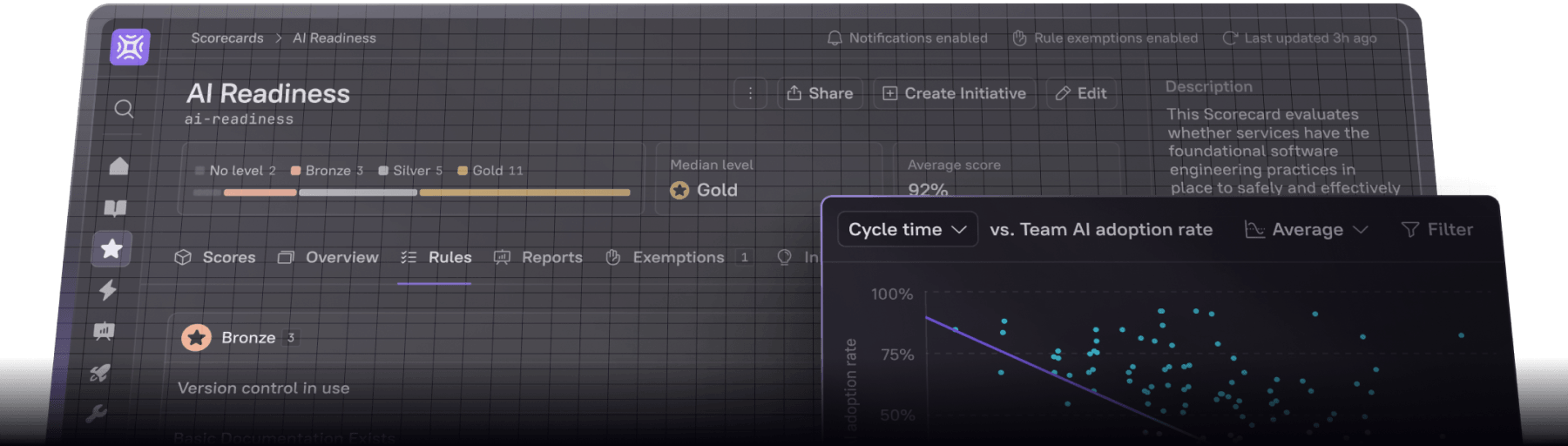
Cortex's scorecard capabilities let organizations define and enforce standards for production readiness, security compliance, and operational excellence. Rules are written in CQL, Cortex's query language, and evaluate live integration data from across your stack, so checks reflect reality rather than self-reported status. Security, SRE, and compliance leads can author rules through a Forms UI builder or in CQL, without hand-editing JSON. Failed checks come with configurable remediation steps and a next-steps view, and rule-level exemption workflows (request, approve or deny, time-bound, with an admin view of every exemption) handle the legitimate exceptions every enterprise has. Leadership reports roll up across the org chart with drilldowns, and automatic rollups route to service owners and team channels out of the box.
The largest difference between Port and Cortex Scorecards is how much you assemble versus how much ships ready to use. Port Scorecard filters apply at the whole-scorecard level; per-rule exemptions are not available. Port Scorecards do not offer a multi-level rollup across the org chart with drilldowns, nor a global scorecard rank-and-drill view. Notifications run through automations you configure: Port can message Slack or Teams and notify the owning team when a rule result changes or a scorecard drops, rather than routing per-rule channels out of the box.
Unlike Port's custom-built approach, Cortex provides pre-configured scorecards for common standards with automated checks against your tooling. Leadership can view heatmaps of compliance across the organization, identify systemic gaps, and track progress toward goals—all without building custom reporting. For engineering organizations operating under regulatory or security requirements, this governance layer is the difference between aspirational standards and enforced ones. H&R Block used Cortex Scorecards to drive production readiness across their service fleet, bringing MTTR from 24 hours to under one.
Dashboards that serve every stakeholder
Cortex provides out-of-the-box, customizable dashboards that work for both engineers and leadership. Developers get detailed, service-level insights through the Engineering Homepage including reliability metrics, ownership, and performance data. Executives and platform teams view high-level reports on service adoption, compliance, and overall platform health.
While Port's dashboards require custom configuration for each view, Cortex offers pre-built templates that teams can use immediately while still supporting full customization. This approach ties directly into Cortex's engineering operations model: every stakeholder—from individual contributors to VPs of Engineering—can access the data they need without waiting for a platform team to build a custom dashboard for them.
One-click service creation with embedded standards
Cortex enables fast, standardized service creation through developer self-service, which uses pre-configured templates to ensure new services follow engineering best practices from day one. Unlike Port, which focuses on automating processes after a service is created, Cortex helps teams establish consistency at the start. This reduces misconfigurations, deployment delays, and technical debt for fast-scaling teams that need to maintain quality while increasing velocity.
This capability reflects Cortex's evolution into an engineering operations platform: rather than providing a blank canvas and expecting teams to encode their own standards, Cortex embeds those standards into the creation workflow itself. New services inherit the right monitoring, ownership, documentation, and compliance checks across the full service lifecycle, turning operational best practices into defaults rather than afterthoughts.
Time-bound campaigns to drive standards adoption
Cortex pairs Scorecards with Initiatives, time-bound improvement campaigns that turn standards from measurement into action. Define a goal ("every service passes the security Scorecard by end of Q2"), set a deadline, and Cortex automatically creates tickets in Jira or ClickUp routed to each team's backlog based on ownership. Tickets auto-close as the underlying Scorecard rule passes. Leadership sees progress across every active Initiative in one view.
Port offers time-bound scorecard goals and its automations can notify the owning team and open a ticket when a scorecard drops. But the full campaign loop must be assembled manually: a deadline-bound Initiative that auto-creates ownership-routed tickets, auto-closes them as each rule passes, and rolls progress across every active campaign into one leadership view.
Operational excellence
Every portal in this comparison, Port included, stops at the catalog and orchestration layer. Cortex adds a layer above it: an operating model for running engineering as a system. DRIVE, a framework authored by Cortex CTO and co-founder Ganesh Datta, measures engineering organizational health in the AI era across five pillars (Delivery, Reliability, Initiatives, Vigilance, and Efficiency). It is paired with the Operational Excellence review, a recurring leadership ritual with roots in how manufacturing runs a whole plant as one observable system.
Cortex is more than a portal. Scorecards, Initiatives, and Engineering Intelligence feed the review directly, the OpEx Review Agent assembles the executive briefing so leaders can parse the signal from the noise. As AI compresses the cost of writing code and moves the bottleneck to governance, ownership, and risk at the organizational level, that human-in-the-loop review becomes the backpressure that keeps output in alignment. Port has no equivalent framework, review cadence, or briefing agent, because it is built as a portal rather than an operating model.
For a detailed feature comparison, explore Cortex vs. Port.
Backstage: Open-source flexibility with maintenance overhead
Backstage is Spotify's open-source developer portal that gained traction as the first widely adopted IDP solution. The platform offers complete flexibility through its plugin architecture and has a growing community of contributors.
Who uses Backstage?
Organizations with strong engineering cultures, dedicated platform teams, and the resources to maintain custom infrastructure often choose Backstage. The platform appeals to teams that want complete control over their developer portal and have the engineering capacity to build and maintain it.
Primary features:
Software catalog with customizable data models
Plugin architecture for extending functionality
Software templates for creating new services
Documentation management through TechDocs
Open-source with no licensing costs
How Backstage compares to Port and Cortex
Backstage represents the "build it yourself" end of the IDP spectrum. Like Port, it requires significant configuration and ongoing maintenance. Unlike Port, which provides a hosted platform with support, Backstage requires teams to deploy, manage, and maintain the infrastructure themselves.
The maintenance burden is substantial. Organizations running Backstage typically dedicate multiple engineers to maintaining the platform, building plugins, and keeping integrations functional as their toolchain evolves. While there's no licensing cost, the total cost of ownership—including engineering time—often exceeds commercial alternatives. Many teams eventually realize they need to break up with Backstage and move to a more sustainable solution.
For organizations evaluating Backstage, explore Backstage vs. Cortex.
OpsLevel: Service maturity with limited scope
OpsLevel is an internal developer portal focused primarily on service maturity tracking and microservices management. The platform provides service catalogs, checks for compliance standards, and reporting on service health.
Who uses OpsLevel?
Organizations that prioritize service maturity tracking and have well-defined microservices architectures often evaluate OpsLevel. The platform works well for teams that want to enforce standards across their service fleet.
Primary features:
Service catalog with ownership tracking
Maturity checks and compliance monitoring
Integration with common DevOps tools
API-first architecture for extensibility
Reporting on service health and standards compliance
How OpsLevel compares to Port and Cortex
OpsLevel sits between Port and Cortex in terms of configuration requirements and feature depth. It provides more pre-built functionality than Port, reducing time to value, but offers less sophisticated engineering intelligence and fewer enterprise features than Cortex.
While OpsLevel focuses primarily on the service catalog and maturity tracking use case, Cortex provides a more comprehensive platform that includes engineering intelligence, developer self-service, and sophisticated governance capabilities. Organizations that need more than basic service tracking—like DORA metrics, velocity analysis, or advanced compliance reporting—will find Cortex's broader feature set delivers more value.
For a detailed comparison, see Cortex vs. OpsLevel.
Is Port the right IDP for you?
Port works best for platform engineering teams with mature practices, dedicated resources, and a strong preference for building custom workflows over using pre-built functionality. If your organization has the engineering capacity to invest in ongoing configuration and maintenance—and values maximum control over data models and automation—Port's approach can deliver value.
For most organizations, the decision comes down to a few key questions:
Do you have dedicated platform engineers who can spend months on initial setup? Port's time to value is measured in months. If you need a portal running in days or weeks, a platform with pre-built data models and automatic discovery will serve you better.
Is maximum configuration flexibility more important than out-of-the-box functionality? Port gives you a blank canvas. If you'd rather start with working defaults and customize from there, Cortex or OpsLevel will get you to value faster.
Do you need enterprise-grade governance and compliance today? Port's governance capabilities are limited compared to platforms built for regulated environments. If scorecards, audit trails, and compliance reporting are requirements, evaluate whether Port can meet them without extensive custom work.
Will your catalog reflect the whole estate at your scale? Automatic discovery that evaluates only a recent slice of entities leaves the rest to be modeled by hand, which is where large and legacy estates get patchy.
Can leadership see standards across your actual org structure? Enterprises run matrixed org charts and complex ownership. Confirm whether a platform rolls scorecards up from VP to IC with drilldowns, or reports mainly at the team and service level.
Can non-platform stakeholders own standards? Security, SRE, and compliance leads should be able to author rules and manage exceptions without hand-editing JSON or filing a ticket with the platform team.
How will you govern AI adoption across the org? As assistants spread, you need ownership, standards, and risk visible across every team and agent, not just in the tools where code gets written.
Are engineering intelligence and DORA metrics a priority? Port's reporting requires configuration to connect sources and tailor dashboards before you get standard views. If data-driven engineering management is a goal, platforms with built-in engineering intelligence provide that capability immediately.
For teams prioritizing service reliability, compliance monitoring, and data-driven engineering excellence, Cortex is the stronger choice. The platform delivers immediate value through automatic service discovery and pre-built integrations while maintaining complete extensibility for custom needs. Cortex's scorecards provide sophisticated compliance tracking with automated enforcement. Engineering intelligence dashboards offer visibility into DORA metrics, cycle time, and reliability indicators that enable data-driven decision making.
Most importantly, Cortex is built for scale. The platform supports thousands of services across hundreds of teams with enterprise-grade security, governance, and access controls. Organizations can start small and grow into the platform's full capabilities without hitting limitations or requiring platform re-architecture. Cortex Academy provides comprehensive training resources to help teams maximize their investment.
The question isn't whether Port can work—with sufficient investment, most platforms can be made to work. The question is whether Port is the most efficient path to the outcomes you care about. For most mid-market to enterprise organizations, the answer points toward platforms like Cortex that balance time to value with sophisticated capabilities and enterprise-grade reliability.
Ready to explore how Cortex can accelerate your engineering excellence initiatives? Explore the platform or book a demo to see it in action.
FAQs
Is Port a SaaS-only solution, or can it be self-hosted?
Port is a multi-tenant SaaS platform. Per Port's own documentation, there's no option to fully self-host it: enterprises can request a single-tenant (still Port-managed) deployment, and integration components plus the Port Agent can run on your infrastructure, with AWS PrivateLink for secure connectivity. If full data residency or self-hosting is a hard requirement, that's worth weighing against SaaS platforms that meet enterprise security standards like SOC 2 Type 2 without it.
How does Port's pricing model work for scaling teams?
Port prices on more than seats. There's a per-seat subscription that grows as adoption spreads beyond the platform team, quota caps on catalog entities and automation runs that can push you to a higher tier as your footprint grows, and an added platform fee at the Enterprise level. Costs can climb from more developers, more of your estate in the catalog, or more automation, so model all three against your projected scale. Then factor in total cost of ownership: licensing plus the engineering time for configuration, maintenance, and ongoing workflow management. Platforms with more pre-built functionality in the base cost carry less of that hidden investment.
What's the difference between an internal developer portal and an engineering operations platform?
An internal developer portal is the interface where developers discover services, look up ownership, and run self-service actions. It answers "what do we have and who owns it?" An engineering operations platform does that too, then adds the operating layer on top: enforcing standards, tracking operational maturity, surfacing engineering intelligence, and governing how software ships and runs across the organization. The portal is the foundation; the operations platform is what turns a catalog into a system leaders run the engineering org from. Cortex is the latter, with the portal built in.
Can Port replace my existing Kubernetes dashboard?
Port can surface Kubernetes data—pods, deployments, namespaces—within its catalog if you configure the integration. However, Port is not a replacement for a dedicated Kubernetes dashboard like Lens or the Kubernetes Dashboard. Port's strength is aggregating metadata across your entire service catalog, not providing real-time operational views of cluster health. For day-to-day Kubernetes operations (debugging pod crashes, inspecting logs, scaling deployments), you'll still need a purpose-built tool. Port works best as a layer above your Kubernetes tooling, providing a catalog view of what's running and who owns it.
How does Port handle Role-Based Access Control (RBAC)?
On top of built-in roles, Port supports property-level granular permissions (letting a member edit only a single field on an entity, for example), team-ownership scoping, and dynamic, context-aware policies that compare attributes on the requester against the entity at request time, so a rule like "only the on-call engineer can edit this workflow" needs no static name list. Permissions span catalog entities, workflows, self-service actions, pages, and AI agents, which inherit the permissions of the identity behind them, and a permission simulator lets you test access before applying changes. Port's audit log covers entities, blueprints, actions, automations, scorecards, runs, integrations, and secrets, including permission changes and AI-triggered runs attributed to the acting identity, which Port positions for SOC 2 and similar requirements.
What is a "Blueprint" in the context of Port?
A Blueprint in Port defines the schema for an entity type in your service catalog. Think of it as a template that specifies what properties, relationships, and metadata a particular category of entity should have. For example, you might create a Blueprint for "Microservice" that includes fields for the owning team, programming language, deployment environment, and related dependencies. Blueprints are the foundation of Port's flexible data model—they let you customize your catalog to match your architecture. The trade-off is that you must define every Blueprint yourself, which means more upfront planning and ongoing maintenance as your data model evolves.