
Software development analytics tools pull data from code repositories, CI/CD pipelines, issue trackers, and developer apps, then turn that data into metrics and insights about how your organization ships software. They surface DORA scores, cycle time, code quality signals, and developer experience data so engineering leaders can find bottlenecks, optimize how their teams ship, and decide where to invest.
The category has gotten crowded. Pure dashboards, DORA trackers, engineering intelligence tools, and engineering operations platforms with governance and automation built in all promise visibility into the development process, but they differ sharply in what they actually do once a problem shows up. Picking the wrong one is an expensive way to learn that distinction.
This guide is built for engineering leaders evaluating that landscape. It covers what software development analytics tools are, the features worth scrutinizing, the tradeoffs between specialized tools and platform approaches, and how to build a shortlist that fits your software engineering organization in 2026.
AI has changed the math on engineering velocity, but not in the way most leaders expected. Cortex's 2026 Benchmark Report: Engineering in the Age of AI found PRs per author up 20% year over year, change failure rates up 30%, and incidents per pull request up 23.5%. Teams are shipping more code and breaking production more often. Only 33% of engineering leaders say they have the data to prove AI is improving outcomes; the rest are running on anecdote.
That gap is what makes analytics tooling a 2026 priority, and it is also why visibility alone will not close it. The same report found that organizations with strong engineering foundations like clear service ownership, solid testing coverage, and well-defined incident response get materially better outcomes from AI than those without. Reporting is the floor. Acting on the data is the differentiator.
In this guide:
What are software development analytics tools?
Key features to look for
8 top tools compared
How to choose the right tool
What Are Software Development Analytics Tools?
Software development analytics tools are platforms that aggregate engineering data across the toolchain (Git, Jira, GitHub Actions, Datadog, PagerDuty, internal services, and similar) and convert it into metrics, dashboards, KPIs, and in-depth insights about how software gets built and operated. They exist to answer the questions engineering leaders ask every week:
How fast are we shipping?
Where are pull requests getting stuck?
Are incidents trending up or down?
Which teams or services are at risk?
Is our engineering investment producing the outcomes we expected?
Most tools focus on a familiar set of categories:
DORA metrics: deployment frequency, lead time for changes, change failure rate, mean time to restore.
Flow metrics: cycle time, PR review time, work in progress, throughput.
Quality signals: code analysis results, defect escape rate, test coverage, code churn, production incidents per service.
Developer experience: focus time, context switches, friction in toolchains, time spent waiting on builds or reviews.
Governance and standards: service ownership, on-call coverage, security posture, production readiness.
Pulling those numbers together is one thing. Acting on them is harder, and it is where most teams stall. A dashboard that shows lead time creeping up will not, by itself, get a PR reviewed faster. A chart of incident frequency will not bring an unowned service into compliance. The meaningful split in this category is between tools that stop at reporting and tools that close the loop with ownership, automation, and enforcement built in.
That distinction shapes the rest of this guide.
Key Features to Look for in Analytics Tools
Software development analytics tools span a wide range, from pure data visualization layers on top of GitHub and Jira to platforms that bundle in governance, automation, and the service ownership context that turn raw metrics into data-driven decisions across the development lifecycle. Which features matter most depends on the problem you are trying to solve, but the eight categories below show up in almost every serious evaluation we have seen.
Integration breadth and depth
An analytics tool is only as useful as the data it can reach. Prioritize native integrations with source control (GitHub, GitLab, Bitbucket), CI/CD (CircleCI, GitHub Actions, Jenkins, ArgoCD), issue trackers (Jira, Linear, Asana), observability (Datadog, PagerDuty, Sentry), and identity (Okta, GitHub teams). A platform with 10 integrations gives you a partial picture. One with 50+ gives you a complete one.
Depth matters as much as breadth: a tool that pulls only commit counts from Git tells a different story than one that joins PR data, deploy events, and incident timestamps into a single timeline. Check whether integrations are read-only or bi-directional, and how easily you can extend coverage to internal systems your vendors do not natively support.
Multi-framework metrics support
DORA, SPACE, and developer experience measurement are the frameworks that matter in 2026. Pure DORA captures throughput and reliability but says nothing about cognitive load, time spent in flow, friction in the toolchain, or developer sentiment. The strongest tools support all three out of the box and combine quantitative signals (cycle time, focus time, build wait time) with qualitative survey data, so leaders see both the system and the human experience of working inside it. Avoid tools that only report on velocity or that require you to assemble cycle time and change failure rate from scratch in a custom dashboard. Measuring speed in isolation leads you to optimize for the wrong thing and miss the friction that compounds into attrition.
One caveat worth flagging. DORA, SPACE, and developer experience research all measure individual or team-level effectiveness. They were not designed to measure how an organization sustainably turns customer needs into software while balancing speed, quality, and cost. As AI compresses the cost of writing code, that gap matters more, not less. The next generation of frameworks will need to focus on organizational effectiveness: the systems, structures, and operational practices that determine whether an engineering org can absorb AI's productivity gains without breaking.
Reporting, dashboards, and programmatic access
Default dashboards are useful for the first week. After that, every engineering org needs to slice metrics by team, service, repository, sprint, or product line, and roll them up to leadership in formats that match how the business actually consumes data. Look for filtering, custom dimensions, saved views, and scheduled reports. Bonus points for tools that let non-technical team members self-serve without engineering having to build them a custom report.
The 2026 question worth asking, though, is whether the data is reachable programmatically. The strongest tools expose metrics through an API or, increasingly, an MCP server, so AI agents, coding assistants, and internal bots can pull cycle time or change failure rate into a chat, a BI platform, a PR review, or a runbook without anyone copy-pasting from a dashboard. As more engineering work flows through AI tools and agents, queryable analytics will outpace pure dashboards.
Service ownership and catalog context
Metrics without context are noise. The Cortex 2026 Benchmark Report found that organizations with clear service ownership get materially better outcomes from AI adoption, and the same logic holds for analytics in general. When change failure rate spikes, you need to know which service, which team, which on-call rotation. A tool wired to a service catalog can answer those questions. A tool without one can only show you the org-wide average and leave you to chase down the owner.
Governance and standards enforcement
This functionality is where dashboards become platforms. The strongest tools let you define engineering standards (production readiness criteria, security baselines, on-call coverage, documentation completeness) for high-quality software delivery and automatically evaluate every service against them. Without enforcement, "improving code quality" is a slide in a QBR. With it, services that fall below threshold get flagged, owners get pinged, and progress is tracked over time. This is the layer that determines whether AI accelerates a healthy development team or amplifies the dysfunction in a broken one.
Predictive insights and anomaly detection
Retrospective analytics tell you what happened last sprint. Predictive analytics tell you what's likely to happen next sprint. Some platforms now offer forecasting (delivery risk scoring, timeline prediction), anomaly detection (flagging unusual patterns in cycle time or failure rate), and AI-powered recommendations.
These features are unevenly mature across the market, but the platforms that do them well (Allstacks, Waydev, LinearB) are worth evaluating if your biggest challenge is anticipating problems rather than documenting them after the fact.
AI impact attribution
New in 2026, and rising fast. As AI coding assistants generate a larger share of code, engineering leaders need to know what is being shipped, by whom (or what), and with what quality outcomes. The tools worth a demo can correlate AI-assisted PRs with change failure rate and incident frequency, and track adoption across development teams against team performance outcomes. Most engineering organizations today cannot answer "is AI improving outcomes or just increasing output?" with data. The tools that close that gap are the ones with attribution built into the data model, not bolted on after the fact.
Automated workflows and actionability
A dashboard that surfaces a problem is the starting point. A platform that helps you fix it is the goal. Evaluate the automation layer: can the tool open a Jira ticket from real-time data when a service falls below ownership thresholds, scaffold a new repo with the right templates, or auto-assign incident responders based on service catalog data? The point of automation in this category is to streamline the path from insight to action, so improvement happens continuously rather than in quarterly bursts.
8 Best Software Development Analytics Tools Compared
1. Cortex
Most tools in this guide are analytics layers: they aggregate metrics from your stack and visualize them. Cortex does that too, but as part of a broader engineering operations platform that also includes a full internal developer portal (service catalog, ownership data, and standards enforcement built in). The result is that productivity metrics live next to the operational context that makes them meaningful: service health, production readiness, dependency relationships, and ownership.
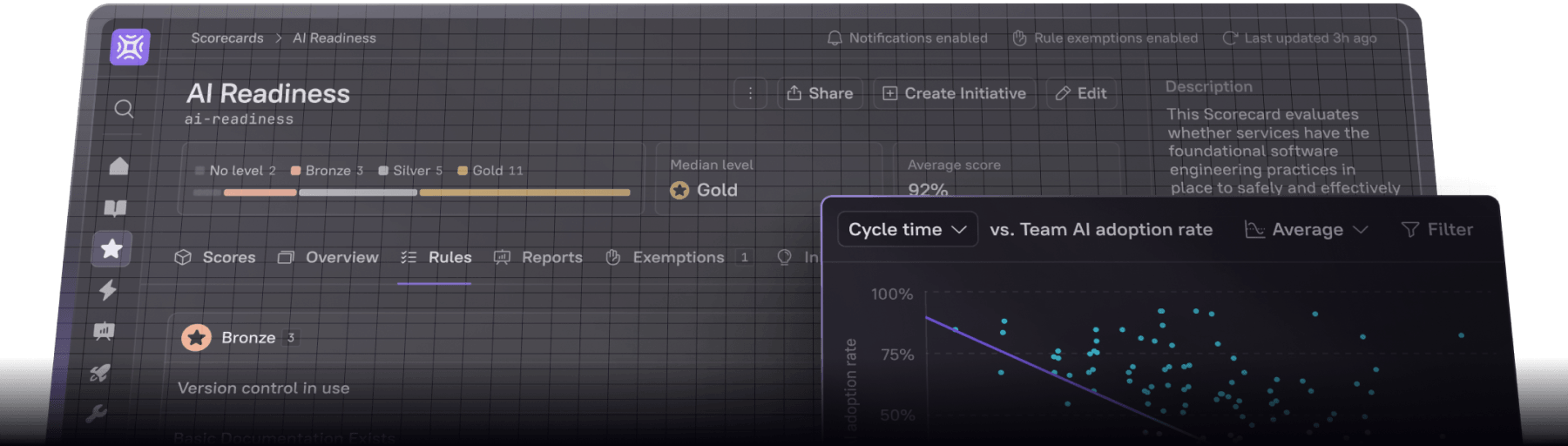
The platform ingests data from 50+ integrations across your git, cloud, identity, security, and ticketing tools to maintain an always-current system of record. Cortex's Engineering Intelligence layer then lets leaders compare delivery metrics (PR size, cycle time, deployment frequency) against custom measures of software maturity, security posture, and operational readiness. No pure-play metrics tool offers that.
In practice, an engineering director can see that Team A's cycle time improved 20%, and see that it happened because they paid down the tech debt flagged by a Cortex Scorecard two sprints ago. That cause-and-effect visibility is what turns metrics from surveillance into strategy.
Key Features
Service Catalog for unified ownership and architecture context. Maintain a single source of truth for every service, team, and dependency. Catalog data feeds every other capability: metrics roll up by ownership, Scorecards evaluate the right services, and incident routing uses the freshest information.
Scorecards for standard enforcement and progress tracking. Define what "production ready" means for your organization, then automatically assess every service against those benchmarks. Track compliance over time with clear, team-level visibility into what's meeting standards and what isn't.
Initiatives for time-bound improvement campaigns. Turn Scorecard gaps into structured projects with deadlines, owners, and progress tracking. Drives the migration, hardening, or compliance push from a chart of dots to a closed-out initiative.
Engineering Intelligence for full-stack performance visibility. DORA metrics, velocity dashboards, and AI impact measurement, all sliceable by team, repo, or author, and correlatable against service health scores.
AI Readiness, Impact, Maturity, and Governance. A four-part suite for organizations adopting AI coding agents: assess foundational readiness, prove ROI with delivery and quality metrics, standardize prompts and rules across repos, and govern the AI/ML models running in production.
Developer Homepage for personalized actionable insights. A tailored interface for each developer showing PR statuses, assigned tasks, service health, and Scorecard progress. Reduces context switches and makes operational context self-service.
Self-service golden paths for standards-aligned service creation. Templates let developers bootstrap new services with security, observability, and operational standards pre-configured, so quality is baked in from the start instead of audited later.
Workflow automations for streamlined developer operations. Automate repository setup, approval processes, notification routing, and compliance enforcement directly within the platform.
Pros and Cons
Pros:
50+ integrations provide genuinely comprehensive data coverage across the full SDLC
Metrics designed for engineers, not just managers: productivity data connects to service quality and reliability
Automated Scorecards and Initiatives turn measurement into time-bound improvement campaigns
Service catalog gives teams a single source of truth for microservice ownership, dependencies, and documentation
The only tool on this list that combines analytics with internal developer portal functionality
Cons:
Ideal for organizations with 50+ engineers, smaller teams running a single project or evaluating their first metrics tool may find a standalone DORA tracker easier to justify as a starting point.
Like any system of record, Cortex takes initial investment to model your services, teams, and standards. The payoff is data that reflects your actual organization, but teams looking for a five-minute overlay on GitHub will need to budget the setup time.
Cortex's opinionated data model maps cleanly to organizations with defined services, teams, and ownership. Highly unusual entity structures may need more configuration to fit.
What Kinds of Companies Use Cortex?
Cortex's customers tend to share three characteristics: a microservice architecture complex enough that ownership and dependencies get fuzzy, an engineering org large enough that "ask the senior engineer" no longer scales, and a leadership team that wants standards enforced systematically rather than chased down quarterly.
The customer base spans startups to Fortune 100, including BigCommerce, Milwaukee Tools, SoFi, Vista, Archer, National Geographic, Bumble, Canva, and Skyscanner. Use cases include:
Production readiness: Once BigCommerce passed 250 engineers, "is this service ready for production?" became a slow, subjective question. Cortex Scorecards turned it into an automated, continuously monitored answer across the service catalog.
Modernization and migrations: Xero outgrew the homegrown internal developer portal they had built themselves and made Cortex the foundation of their Engineering Operations function.
Compliance and audits: LetsGetChecked scaled from 15 to 100+ services while staying HIPAA and HITRUST compliant. Cortex Scorecards embed compliance requirements at service creation, so every new service is evaluated against minimum standards before it reaches production.
Developer and agent self-service: Vista became an early MCP adopter, letting engineers query catalog and metric data from AI tools without leaving the IDE. Archer used Cortex Workflows to compress concept-to-deployed-service on Kubernetes from months to under three hours.
Companies with three engineers and one service likely don't need Cortex. Companies running 100+ services across multiple teams, where ownership confusion has real cost, almost certainly do.
Pricing
Custom pricing based on organization size and implementation needs. Try the interactive demo to explore the platform or reach out to sales for a custom demo tailored to your use case.
2. LinearB
LinearB is a DORA metrics platform that has expanded into AI-powered workflow automation. Specific capabilities worth knowing: AI code review that flags security and quality issues before merge, Monte Carlo forecasting that models delivery probability from historical PR data, and a Slack and Teams bot that surfaces stalled PRs and process bottlenecks to individual developers. LinearB also tracks AI coding tool adoption (Copilot, Cursor, and others), which is increasingly useful as orgs roll out AI assistants and want to measure whether the spend is paying off.
Key Features
DORA metrics with intuitive dashboards and trend tracking
AI-powered code review automation
Monte Carlo forecasting for delivery timeline prediction
Developer coaching dashboards
AI coding tool adoption measurement
gitStream for custom workflow automation
Pros and Cons
Pros:
AI code review and workflow automation push past measurement into active improvement
Monte Carlo forecasting provides probabilistic delivery estimates that finance and product teams trust
Easy setup with dedicated customer success managers
Enterprise-ready: SOC 2 Type 2, ISO27001, GDPR compliant
On-premise deployment available
Cons:
Narrower integration set: primarily focused on GitHub, Jira, Jenkins
Less contextual depth around service health and operational maturity
Permissions and admin controls are more limited than enterprise buyers expect
Built as a metrics and automation layer; organizations that also need ownership data, dependency mapping, or self-service service creation will be pairing LinearB with another tool.
What Kinds of Companies Use LinearB?
Engineering teams of 20–500 developers that want workflow automation alongside metrics, particularly organizations committed to a GitHub/Jira stack.
Pricing
Free for up to 10 developers. Essentials at $29/developer/month. Pro at ~$35/developer/month (billed annually). Enterprise at $59/developer/month with unlimited repos and 3–5 year data retention.
3. Jellyfish
Jellyfish is software engineering intelligence platform focused on connecting engineering activity to business objectives. The platform generates virtual time cards showing allocation across roadmap work, support, infrastructure, and unplanned tasks.
Jellyfish's core strength is the finance angle: software capitalization reporting, headcount justification, and resource allocation visibility.
Key Features
Engineering time allocation and investment tracking
Scenario modeling, CapEx reporting, and capacity planning
Board-ready reporting and executive dashboards
DORA and SPACE metrics
AI impact dashboard connecgting tool usage and spend to delivery and quality metrics
Pros and Cons
Pros:
Strong bridge between engineering and finance/executive stakeholders
Sophisticated time allocation modeling without manual time tracking
Useful for headcount planning and investment justification
Cons:
Complex configuration with a steep first-few-weeks curve
Reports and dashboards offer limited customization versus what enterprise teams typically need
Rigid constructs that don't accommodate unusual team structures
Data sync is not real-time; updates lag, which can break in-sprint decision-making
Metrics without operational context — numbers without clear next steps
Integration issues reported with Okta and Jira setups
What Kinds of Companies Use Jellyfish?
Large enterprises (500+ engineers) where engineering management reports to the CFO or where software capitalization reporting is a hard requirement.
Pricing
Custom enterprise pricing. No free tier. Demo available on request.
4. Waydev
Waydev is an AI engineering intelligence platform. The platform covers DORA, SPACE, and developer experience frameworks, and has rebuilt itself around a conversational AI core.cently released new AI reporting modules: AI Impact, AI Adoption, AI ROI, and Waydev Agent.
Key Features
Conversational AI interface for exploring engineering data
DORA + SPACE + DX framework coverage
AI coding tool adoption tracking (Copilot, Claude, Cursor, Devin)
Sprint planning and delivery forecasting
Investment balance and resource allocation views
Predictive analytics and benchmarking
Pros and Cons
Pros:
Conversational AI interface is innovative for data exploration
Comprehensive framework coverage in a single platform
Strong AI tool adoption tracking, including newer tools
Published customer outcomes include doubled productive throughput and 20–30% increases in commits per day
Cons:
AI-heavy features may be overkill for teams wanting straightforward dashboards
UI and features change frequently and documentation can lag
Primarily backward-looking, limited forecasting features
Historical data retention is tier-gated; year-over-year analysis effectively requires the top tier
What Kinds of Companies Use Waydev?
Large engineering organizations who want AI agents to surface insights conversationally rather than building dashboards by hand.
Pricing
Custom pricing. No free tier publicly available. Contact sales.
5. Flow (by Appfire)
Flow (formerly GitPrime and Pluralsight Flow) was acquired by Appfire in February 2025 and now operates as a standalone product. It transforms commit, ticket, and PR data into engineering insights with a focus on activity metrics: active days, commit patterns, code churn, and efficiency ratios.
Key Features
Git-derived code analytics, like PR analysis, coding patterns, activity metrics
DORA metrics with historical trend analysis
Pull request workflow insights, including Reaction Time, Influence, and Review Coverage
Individual and team productivity dashboards
Skills gap analysis and learning recommendations
GitHub, Jira, Azure DevOps integrations
Pros and Cons
Pros:
Strong CapEx and software capitalization reporting
Team Health features surface workload imbalances
Works across multiple git providers
Good for organizations already in the Pluralsight/Appfire ecosystem
Cons:
Activity-based metrics (active days, code churn) are increasingly seen as outdated proxies for actual output
Product development and UI modernization have slowed under new ownership
Tool is designed for management view; developer adoption is a documented challenge
No external benchmarking
What Kinds of Companies Use Flow?
Organizations already in the Appfire ecosystem, or teams that need software capitalization reporting for finance compliance.
Pricing
$50/user/month (billed annually). Previously offered tiered pricing at $38–50; now consolidated to a single plan post-Appfire acquisition. 30-day free trial available.
6. Allstacks
Allstacks is an agentic software engineering intelligence platform that uses AI agents to plan, measure, and forecast software delivery. What sets Allstacks apart from a pure DORA tool is the upstream and downstream extensions. Upstream, the Spec Readiness Agent uses adversarial AI to grade specs across five disciplines before sprint. Downstream, R&D Capitalization Reporting generates audit-ready financial reports from engineering activity without timesheets, a distinctive play for finance-led buyers. The familiar DORA, SPACE, project forecasting, and developer experience surveys sit in between.
Key Features
Intelligence Engine for AI-powered delivery risk analysis and recommended actions
Project forecasting with ML predictions that flag delivery risk three to four weeks early
Spec readiness agent that uses adversarial AI to grade specs across five disciplines before sprint
AI-powered deep research for natural-language investigation of initiatives, risk, and AI impact
R&D capitalization reporting generated from engineering activity
Engineering frameworks with pre-built DORA and SPACE support and industry benchmarks
120+ engineering metrics across delivery, quality, DevOps, and team health
Pros and Cons
Pros:
Forecasting and risk assessment are differentiated capabilities
Full transparency into underlying data behind every metric
Intelligence Engine offers AI-driven analysis beyond static dashboards
Strong R&D capitalization reporting
Cons:
Data retrieval from sources can experience delays, problematic for near-real-time needs
User management (onboarding, team associations) is more manual than competitors
Initial setup can feel overwhelming and platform polish is uneven
What Kinds of Companies Use Allstacks?
Particularly strong fit for engineering organizations who need to deliver board-ready narratives, finance partners running R&D capitalization, or product organizations wanting upstream spec quality reviews.
Pricing
Tiered pricing. Premium starts at $400/year/contributor. Enterprise $600/year/contributor. R&D Cap $200/year/contributor. Additional support add-ons offered.
7. Swarmia
Swarmia markets itself as "engineering intelligence you can trust" and combines DORA metrics, developer experience surveys, and software capitalization reporting in a single product. Recent investments include Swarmia AI, marketed as "always-on engineering analyst," and an MCP server that lets AI agents query engineering data directly.
What distinguishes Swarmia from peers is the focus on bottom-up adoption and low-touch deployment. The product also leans into Initiatives and Feedback loops, where metrics drive improvement campaigns and Slack-based nudges rather than sitting in dashboards waiting to be opened.
Key Features
Swarmia AI and MCP for natural-language queries and AI agent access
DORA and engineering metrics spanning cycle time, throughput, code review, and team health
AI adoption and cost tracking for Copilot, Cursor, and other AI coding tools
Investment balance showing where engineering effort goes across feature work, tech debt, KTLO, and infrastructure
Developer experience surveys for qualitative feedback
Feedback loops that send Slack-based nudges to teams when patterns drift
Software capitalization reporting with audit-ready cap reports from engineering activity
Pros and Cons
Pros:
Low-touch deployment with clean, user-friendly setup
Modular pricing lets you buy only the capabilities you need
Developer surveys correlated with DORA metrics provide qualitative + quantitative insight
Free tier for up to 9 developers
Strong anti-surveillance positioning that developers appreciate
Cons:
Less suited for large organizations — aggregating data across many teams has limits
Narrower integration set compared to more established platforms
Users report customization options are limited and some feature sets are shallow
Full-suite pricing ($286–$450/developer/year) approaches enterprise tool costs
What Kinds of Companies Use Swarmia?
Small-to-mid-size engineering organizations (10–200 developers) with IC-led or bottom-up cultures that want both quantitative metrics and qualitative survey data, without consulting overhead to get started.
Pricing
Free for up to 9 developers. Single module at $23/developer/month. Full suite pricing available via demo.
8. Sleuth
Sleuth launched as a deployment tracking and DORA metrics platform, with a measurement model focused on deploy events rather than ticket updates or commit activity. In 2026, Sleuth materially repositioned the company around AI agent governance. Sleuth Skills is now the flagship product: a control plane for managing rules, MCP servers, and agent skills across Cursor, Claude Code, Copilot, Codex, and Gemini.
Sleuth still sells their DORA product, which is the analytics-relevant offering for this buyer's guide. It tracks deploy frequency, change lead time, change failure rate, and MTTR using a deploy-centric calculation model, with automations to clean delivery data and integrations across the modern toolchain.
Key Features
Automated deployment tracking and DORA measurement
Change impact analysis (code, feature flags, infra)
Deployment frequency, lead time, MTTR, and change failure rate
Slack-native notifications and reporting
LaunchDarkly, GitHub Actions, and CI/CD integrations
Pros and Cons
Pros:
Dead-simple setup for DORA metrics
Automatic deployment detection reduces manual configuration
Change impact mapping connects deploys to service health
Affordable pricing for smaller teams
Cons:
Narrow scope: primarily DORA metrics and deployment tracking
No broader engineering analytics (time allocation, investment tracking, developer experience)
Limited enterprise features
Product investment has shifted toward Skills (AI agent governance) in 2026. Buyers evaluating Sleuth for DORA alone should weigh that the company's lead pitch is no longer their use case.
What Kinds of Companies Use Sleuth?
Small-to-mid-size engineering teams that want accurate DORA metrics without paying for (or configuring) a full analytics platform.
Pricing
Custom pricing. No free tier publicly listed for DORA product. Contact sales.
How to Choose the Right Tool for Your Team
There is no universal best software development analytics tool. The right choice depends on what problem you are actually solving: measuring delivery velocity, enforcing engineering standards, justifying R&D capitalization to finance, or proving AI ROI to the board. The most common tooling mistake is leading with a feature comparison when the real question is scope. The strongest tools cover more than one of those problems in a single platform, which is why the analytics investment compounds over time.
Teams that lack DORA visibility can solve that problem with a metrics platform in a few weeks. Teams that already have metrics but aren’t seeing tangible results need governance and standards enforcement, which means considering solutions that combine analytics with service ownership, automated scorecards, and workflow automation.
Evaluation Criteria
Feature set: Match the tool to the work, not the demo. If your priority is closing the loop between metrics and action, weight governance and automation features higher than reporting depth. If your priority is forecasting delivery for the board, lean toward predictive analytics. Pure DORA dashboarding is increasingly table stakes; what differentiates tools today is what they do once a problem shows up.
Customization and usability: A tool that requires a full-time configuration specialist is an ongoing cost that doesn't show up in the price tag. Make sure your team can operate it without dedicated administrators.
Scalability: Some tools that shine at 50 developers hit walls at 500. Confirm the platform handles 3x the engineers and 5x the services you have today.
Security and compliance: SOC 2 Type 2, SSO, audit logs, data residency requirements. Table stakes for enterprise, but verify rather than assume.
Cost and ROI: Compare total cost of ownership: implementation time, ongoing maintenance, integration effort, and the hours engineering leaders spend interpreting metrics rather than acting on them. The best tools pay back through better decisions and faster action; the worst become expensive dashboards no one opens.
Shortlist Tools Based on Your Key Needs
Before you book a single demo, write down the three engineering decisions you want this tool to support over the next year. For example:
Reduce cycle time from 8 days to 4
Pass our SOC 2 audit without engineering fire drills
Tell our board whether AI investment is paying off
Match those decisions to the tools that actually solve them. If forecasting board-ready narratives is the priority, Jellyfish and Allstacks rank higher. If AI code review automation is the priority, LinearB stands out. If governance and ownership across services is the priority, Cortex sits in the top tier. Shortlist three to five tools, not ten.
Test Multiple Platforms
Demos can be misleading. Insist on a hands-on pilot. Most vendors offer 14 to 30 days free, and the serious ones will assign a customer engineer to help you set it up. Connect the tool to your actual data, not a sandbox. Run two or three tools side by side on the same dataset and have your team use them daily for at least two weeks. The patterns you catch in real use that you miss in a demo are usually the ones that matter: where the data model bends, how the tool handles edge cases in your org structure, whether the UX feels right for the people who'll actually open it every day.
Specifically test:
How long setup actually takes (not the "quick start" estimate, the real one)
Whether your team's data appears correctly and completely
How often people log in after the first week
Gather Feedback from Engineering and DevOps Teams
Analytics tools fail when developers see them as surveillance. Before committing, get signal from the people who'll actually be measured by the system, because a tool that leadership loves but ICs resent contributes to burnout and produces worse outcomes than no tool at all.
Useful questions to ask them:
Did you log in voluntarily during the trial?
Did the data match your mental model of the service?
Did the tool save time, or create new work?
Learn More About Cortex
Cortex was built for the gap this guide makes clear. Most software development analytics tools stop at the dashboard. They surface metrics but leave the standards enforcement, the migration plan, and the actual fix to the engineering organization to work out on its own. Productivity numbers without operational context are noise.
Cortex's engineering operations platform combines the analytics depth of a dedicated SEI tool with the operational context of a service catalog and the governance muscle of automated Scorecards and Initiatives. Engineering Intelligence surfaces DORA metrics, cycle time, deployment frequency, and AI impact attribution, all sliced by team, repo, or author and correlatable against service health, ownership, and standards data. Scorecards turn standards into automated assessments. Initiatives convert gaps into time-bound improvement campaigns. Workflow Automations execute the routine work that would otherwise sit in a ticket queue. AI Readiness, Impact, Maturity, and Governance close the loop on the AI-era questions every engineering leader is being asked to answer.
The result is a platform where productivity metrics live next to the operational context that makes them meaningful, where AI adoption is measured against real delivery outcomes, and where engineering organizations can prove the ROI of every improvement initiative they ship.
Here are a few ways you can see Cortex in action:
Try the live interactive demo →
Download the 2026 Engineering in the Age of AI Benchmark Report →